Als jemand, der in seinem Leben schon viele innovative Gadgets gesehen hat, war ich skeptisch, ob ein kleines Modul wie der Up2Stream Mini wirklich das Potenzial hat, ein herkömmliches Audiosystem in ein modernes Streaming-Wunder zu verwandeln. Doch als ich ihn in einem Lautsprecher zum Mitnehmen einbaute, änderte sich meine Meinung grundlegend. In meinem 60. Lebensjahr habe ich schon viele Entwicklungen erlebt – und dieser kleine Streaming-Kopf hat mich überrascht.
Erste Eindrücke und Vorbereitung:
Zu Beginn war klar, dass der Up2Stream Mini mit seinen kompakten Maßen von etwa 55 x 42 x 12 mm und einem Gewicht von lediglich 60 Gramm ideal in einen tragbaren Lautsprecher integriert werden konnte. Ich erinnere mich noch gut daran, wie ich das Modul in meiner Werkstatt auspackte und mir vorstellte, wie es in einem Gehäuse zum Einsatz kommen könnte, das ich überallhin mitnehmen kann. Mit der nötigen Sorgfalt und etwas handwerklichem Geschick baute ich den Mini in einen alten, aber geliebten Lautsprecher ein, den ich über die Jahre gesammelt hatte. Es war ein freudiger Moment, als ich die Vorbereitungen abschloss und wusste, dass sich etwas Großes ankündigte.
Integration in den tragbaren Lautsprecher:
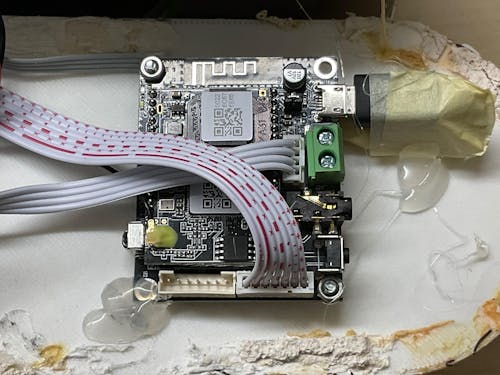
Der Einbau verlief erstaunlich unkompliziert. Zunächst habe ich darauf geachtet, dass alle Verbindungen – sei es für die Stromversorgung oder den Audioausgang – sauber und stabil montiert sind. Ich entschied mich, einen separaten USB-Ladeadapter zu verwenden, um eventuelle Störgeräusche zu vermeiden. Die Montage im Gehäuse erforderte etwas Fingerspitzengefühl, da ich darauf achten musste, dass das Modul nicht nur mechanisch sicher fixiert, sondern auch gut belüftet ist. Schließlich sollte der Klang nicht durch Hitzestau beeinträchtigt werden.
Streaming und Bedienung:
Ein wesentlicher Pluspunkt des Geräts ist seine Unterstützung moderner Streaming-Dienste. Über die kostenlose 4STREAM-App – erhältlich für iOS und Android – konnte ich meinen Up2Stream Mini problemlos konfigurieren. Die Einrichtung verlief schnell: Ich verband das Gerät mit meinem Heimnetzwerk und richtete anschließend den sogenannten Direct Mode ein, der es mir erlaubt, auch unterwegs ohne eine vorhandene WLAN-Infrastruktur zu streamen. So kann ich nun, wenn ich an einem sonnigen Tag am See sitze oder im Park entspanne, meine Lieblingsmusik genießen, ohne auf Kabel oder stationäre Geräte angewiesen zu sein.
Die App bot mir nicht nur eine einfache Bedienung, sondern auch die Möglichkeit, Firmware-Updates durchzuführen, was für mich als Technikenthusiast immer ein wichtiges Kriterium ist. Ich schätzte besonders, dass ich zwischen verschiedenen Betriebsmodi wählen konnte: Ob im Standalone-Modus oder als Teil eines Multiroom-Systems – die Möglichkeiten schienen nahezu grenzenlos.
Persönliche Erfahrungen im mobilen Einsatz:
Das eigentliche Highlight war für mich die Anwendung im mobilen Lautsprecher. Früher war es stets mühsam, einen hochwertigen Sound unterwegs zu gewährleisten. Mit dem Up2Stream Mini konnte ich jedoch eine nahtlose Verbindung zu Musikdiensten wie Spotify und sogar zu meinem NAS herstellen, sodass ich jederzeit Zugriff auf meine gesamte Musiksammlung hatte. Besonders beeindruckend fand ich den Direct Mode: Ohne auf ein vorhandenes WLAN angewiesen zu sein, eröffnete sich mir eine völlig neue Flexibilität im Umgang mit Musik.
Der Klang, den ich aus dem modifizierten Lautsprecher hörte, war überraschend rein und detailreich – ein Beweis dafür, dass Technik nicht immer groß und sperrig sein muss, um beeindruckend zu sein. Selbst bei höheren Lautstärken blieb der Sound klar, ohne störende Verzerrungen oder Rauschen. Dies ist in meinen langjährigen Erfahrungen als Audioliebhaber selten geworden, denn oftmals muss man Abstriche bei der Klangqualität hinnehmen, wenn man auf Mobilität setzt.
Fazit und Ausblick:
Insgesamt hat mich der Up2Stream Mini in meiner täglichen Nutzung überzeugt. Die einfache Integration in meinen tragbaren Lautsprecher, gepaart mit der Flexibilität im Streaming und der herausragenden Klangqualität, macht dieses Gerät zu einem unverzichtbaren Begleiter für alle, die auch unterwegs nicht auf erstklassigen Sound verzichten möchten. Als jemand, der schon viele technische Entwicklungen miterlebt hat, kann ich mit ruhiger Zuversicht sagen, dass der Up2Stream Mini nicht nur ein kleines Gadget ist, sondern ein echter Game-Changer für mobile Audiosysteme darstellt.
Ich empfehle jedem, der auf der Suche nach einer innovativen Lösung für unterwegs ist, sich dieses Modul einmal genauer anzusehen. Mit dem Up2Stream Mini wird aus einem simplen Lautsprecher ein mobiles Kraftpaket – und das ist für einen erfahrenen Genießer wie mich ein echter Mehrwert im Alltag.


 . Efter att ha lyckats växla till Bluetooth-läge kommer enheten att tända det blå ljuset;





6 kommentarer
Arylic
Hi Donar, now you can switch the Bluetooth name in our 4STREAM APP!
Arylic
Hi Hung,
For Android system, you can refer to this app for help you add Airplay ability:https://forum.arylic.com/t/add-airplay-to-your-android-phone/180
Arylic
For WiFi, you may need specific online music services for streaming. Like Spotify, Tidal etc. The phone call is not supporting streaming via WiFi. But if you are streaming with Bluetooth source, then that is available.
Yes, you can use Airplay to stream YouTube videos and YouTube music, just noted that there may have micro delay when you watch videos. Different scenario varies on your network.
Bruce Day
I would like to use the S10 as a streaming source via wifi for whatever audio is coming through my phone (not necessarily an app). For example if I receive a phone call can I stream the phone call from my phone through the S10/amp/speaker? Secondly I would like to stream audio from a basic YouTube app video (not the YouTube music app). Will the S10 receive the audio stream from my phone of a basic YouTube app? Finally does the S10 support the YouTube music app? Thanks in advance.
Hung
How to stream youtube, vimeo… as audio source on android? It works on IOS only as you show but not android.
Donar Alofs
Bummer. I used an Arylic v2 device to check if it cod replace a raspberry pi and Hifiberry with Moode. But the Bluetooth device name does not change into the device name I choose. Useless if you have more than one. Extra bummer because I really like the analog sou d coming out of the device. It can really reduce the Bass the way I like it.
Lämna en kommentar
Alla kommentarer granskas innan de publiceras.
Denna webbplats är skyddad av hCaptcha och hCaptchas integritetspolicy . Användarvillkor gäller.